
RevenueCat
Connect RevenueCat so in-app purchases, renewals, and refunds become RefRef facts, and RefRef gives free premium access as a Reward with a RevenueCat entitlement.
The RevenueCat integration works in two directions:
- Facts in. In-app purchases, renewals, refunds, and subscription ends that RevenueCat reports become
purchaseEvents, purchase adjustments, and Subscription facts in your Project. Your server does not send them to the RefRef API. - Rewards out. RefRef delivers a Program's custom Rewards as free premium access: it grants a RevenueCat entitlement for a number of billing periods. The customer keeps paying the store price, and the access ends on its own.
The App Store and Google Play bill the customer, not RevenueCat. RefRef therefore cannot give a store discount or account credit. Deliver those Rewards through your product, or record them by hand.
You connect one RevenueCat project to each Project. RevenueCat keeps sandbox and production purchases in the same project, so RefRef uses the mode of your Project: a Sandbox Project keeps only sandbox events, and a Live Project keeps only production events. Connect a separate RevenueCat test project to your Sandbox Project, and your production project to your Live Project. Start in the Sandbox Project.
A Project uses one billing provider today. If your web checkout uses another provider, you cannot connect RevenueCat to the same Project yet.
Connect RevenueCat
-
In RevenueCat, open Project settings → API keys, select + New, and create a secret API key of version V2. Give it these permissions:
Permission What RefRef uses it for project_configuration:projects:readRecognize the project when you connect project_configuration:entitlements:readFind the entitlement of a premium access Reward project_configuration:products:readRead the billing period of the customer's product customer_information:customers:readFind missed purchases and read the customer's active entitlements customer_information:customers:read_writeGrant and revoke the entitlement, and keep a record of each grant customer_information:subscriptions:readRead subscriptions and their store transactions customer_information:purchases:readRead one-time purchases, to check the referee's purchase history -
In RefRef, open the Project's Settings → Integrations, choose RevenueCat, paste the key (
sk_…), and select Connect. RefRef checks the key with RevenueCat and stores it encrypted. The key must reach exactly one RevenueCat project.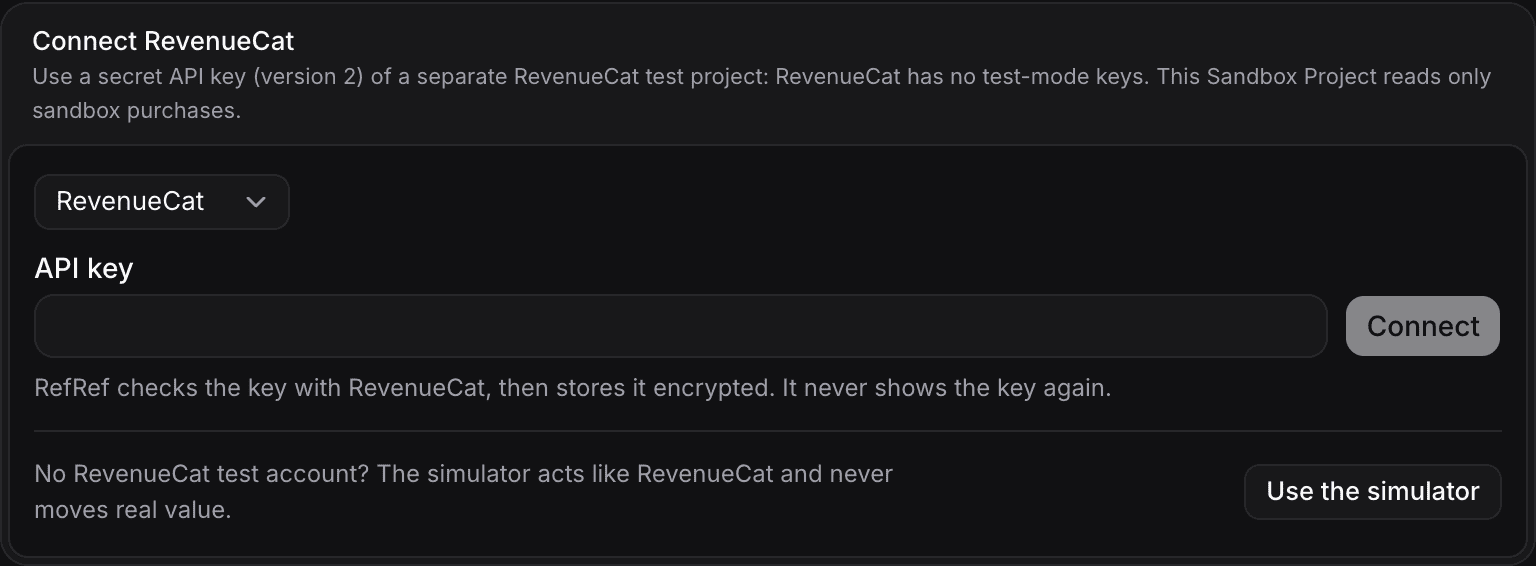
-
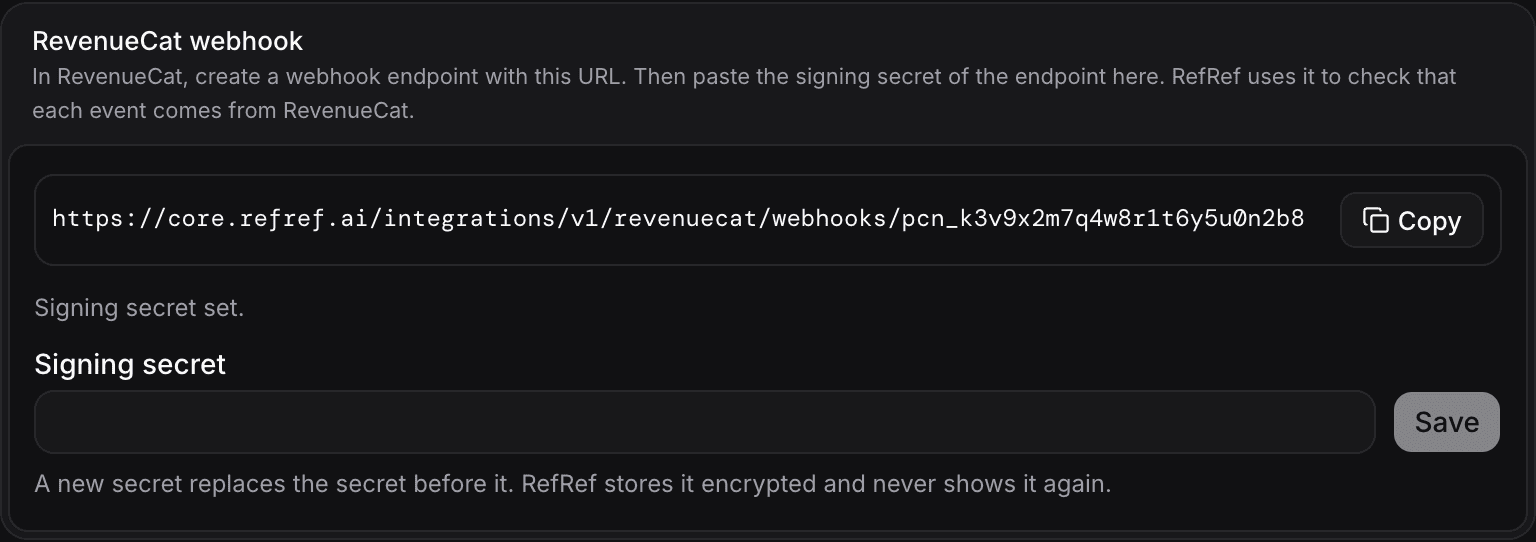
The connection shows its webhook URL, which ends in
/integrations/v1/revenuecat/webhooks/<connectionId>. Copy it. -
In RevenueCat, open Integrations → Webhooks and select Add new configuration. Enter the webhook URL, then choose one of these checks:
- HMAC signing. Turn on HMAC webhook signing and copy the signing secret. RefRef checks the signature of each event, and refuses a changed body, a timestamp more than five minutes old, or another secret. This is the stronger check.
- Authorization header. Set the authorization header value to a random value of at least 32 characters, and keep a copy of it. RefRef compares the header with the value that you store, with or without a
Bearerprefix. This check does not sign the body.
-
In the same configuration, send events for sandbox purchases only for a Sandbox Project, or production purchases only for a Live Project. Send the events of all apps of the project. RefRef drops an event of the other environment.
-
In RefRef, paste the signing secret or the authorization header value into the connection's Signing secret field, and select Save. Until you save it, RefRef refuses the events of the webhook.
RevenueCat tries a failed delivery again with the same event ID. RefRef stores a repeated event once.
| RevenueCat event | What RefRef records |
|---|---|
INITIAL_PURCHASE | The start of the Subscription (a trial when the purchase is a free trial), and a purchase Event (invoice) unless it is a free trial |
RENEWAL | A purchase Event (invoice); for a trial conversion, also the start of the paid period |
NON_RENEWING_PURCHASE | A purchase Event (order) |
CANCELLATION with a refund | A refund purchase adjustment |
REFUND_REVERSED | A restoration that reverses the refund |
EXPIRATION | The end of the Subscription, or a pause when the store paused it |
TRANSFER, TEST, and other types | Nothing. RefRef acknowledges the event. |
A promotional grant (also the grant of a premium access Reward) and a Family Sharing purchase are not purchases, and give no fact.
Name the customer in the app
RefRef never matches a RevenueCat customer by email. It uses the RevenueCat App User ID as the participant's externalId.
When the user signs in, before any purchase, your app calls Purchases.logIn with the same user ID that your backend sends to RefRef:
import Purchases from "react-native-purchases";

// The same ID that your backend sends to RefRef as participant.externalId.
await Purchases.logIn(user.id);
An anonymous App User ID ($RCAnonymousID:…) is not a participant. If a purchase can happen before sign-in, set these subscriber attributes. RefRef reads them only while the App User ID is anonymous:
| Subscriber attribute | Value |
|---|---|
refref_external_id | The participant's externalId in the Project, for example your user ID. |
refref_participant_kind | individual (the default) or group, for a team account. Another value names nobody. |
When the App User ID is anonymous and no attribute names a participant, RefRef looks for one non-anonymous alias of the customer that is already a participant. It never creates a participant from an alias. A purchase that names nobody gives no fact.
How referrals reach your app
A RevenueCat purchase carries no referral link. RefRef attributes it through the referral that its participant already has, so the referral must exist before the purchase:
- A referral code at signup. Your app's signup accepts a referral code, and your backend sends it in
refCodeon the signup Event. See referral codes typed by the person. - A web signup. The person follows the referral link and creates the account on your website, which runs the landing script and identifies the browser at signup. The person then signs in to the app with the same user ID.
RefRef does not carry a referral link through an App Store or Google Play install.
What RefRef does with the facts
- First purchase. The participant's referral gives the Subscription and its first purchase their attribution.
- Renewals. Each renewal inherits the referral of its Subscription, also after the attribution window. A Program rule that pays on each purchase earns a Reward on each renewal.
- Amounts. RefRef records the price in the currency of the purchase. The amount for percentage Rewards is the proceeds: the price less the tax and the store commission that RevenueCat estimates.
- Paid history. Before RefRef evaluates a purchase Reward, it reads the referee's App Store and Google Play transactions between the referral and the purchase, so that a "first purchase" rule counts only a first purchase. See Limits.
- Refunds. A refund removes the whole purchase, and Rewards calculated from it get a matching adjustment. A reversal of the refund restores it. RefRef does not take back a Reward that it already delivered: void the Reward in the Console to remove the access.
- Transfers. When RevenueCat transfers purchases to another App User ID, for example after a restore on another account, the Subscription keeps the participant that it had in RefRef.
- Missed events. RefRef reads the customers of the project at intervals, and records the App Store and Google Play purchases that a webhook did not bring for customers whose App User ID is a participant.
Deliver Rewards in RevenueCat
In the Program's settings, open Delivery. RevenueCat can deliver only custom Rewards:
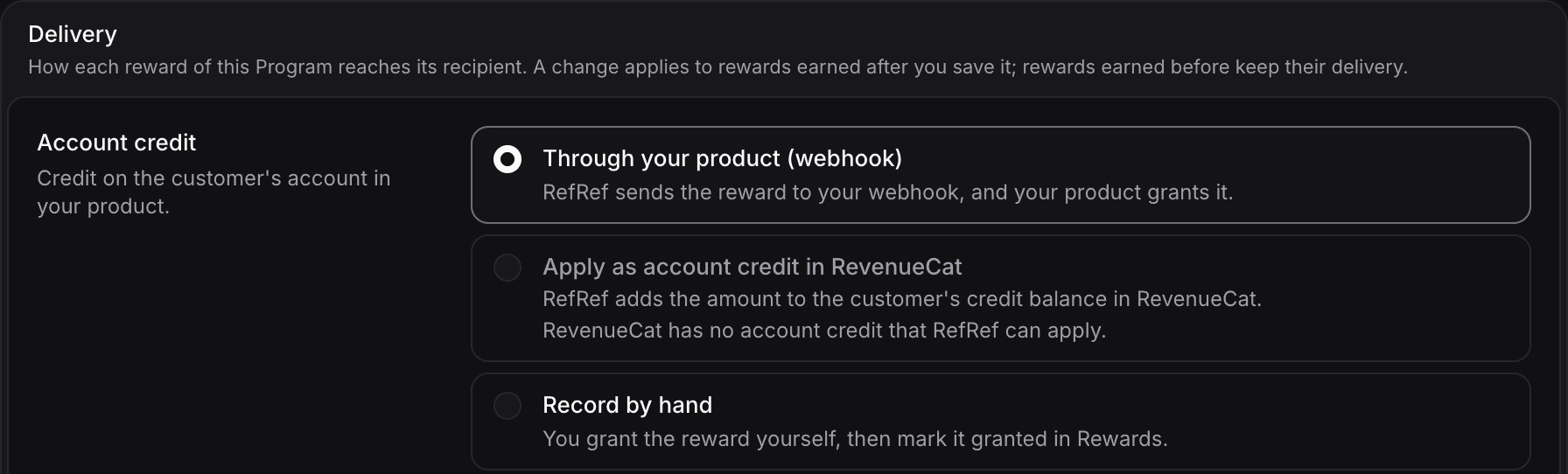
| Reward | Delivery in RevenueCat |
|---|---|
| Custom | Free premium access: a grant of an entitlement for a number of billing periods. See Give free premium access. |
| Account credit | Not available: the store bills the customer. Choose Through your product (webhook) or Record by hand. |
| Discount | Not available: RevenueCat cannot give a store discount to one customer. Choose Through your product (webhook) or Record by hand. |
Give free premium access
A custom Reward can give the customer a higher entitlement, for example pro, for a number of billing periods. The store subscription does not change, so the customer keeps paying the current store price. Your app must give the higher features to every customer who has the entitlement, from any source.
Set it up
- In the Project's Settings → Custom units, add a unit for the access, for example "Pro month".
- In the Program's rules, give that unit as a custom Reward with a quantity of 1. A plan upgrade refuses another quantity.
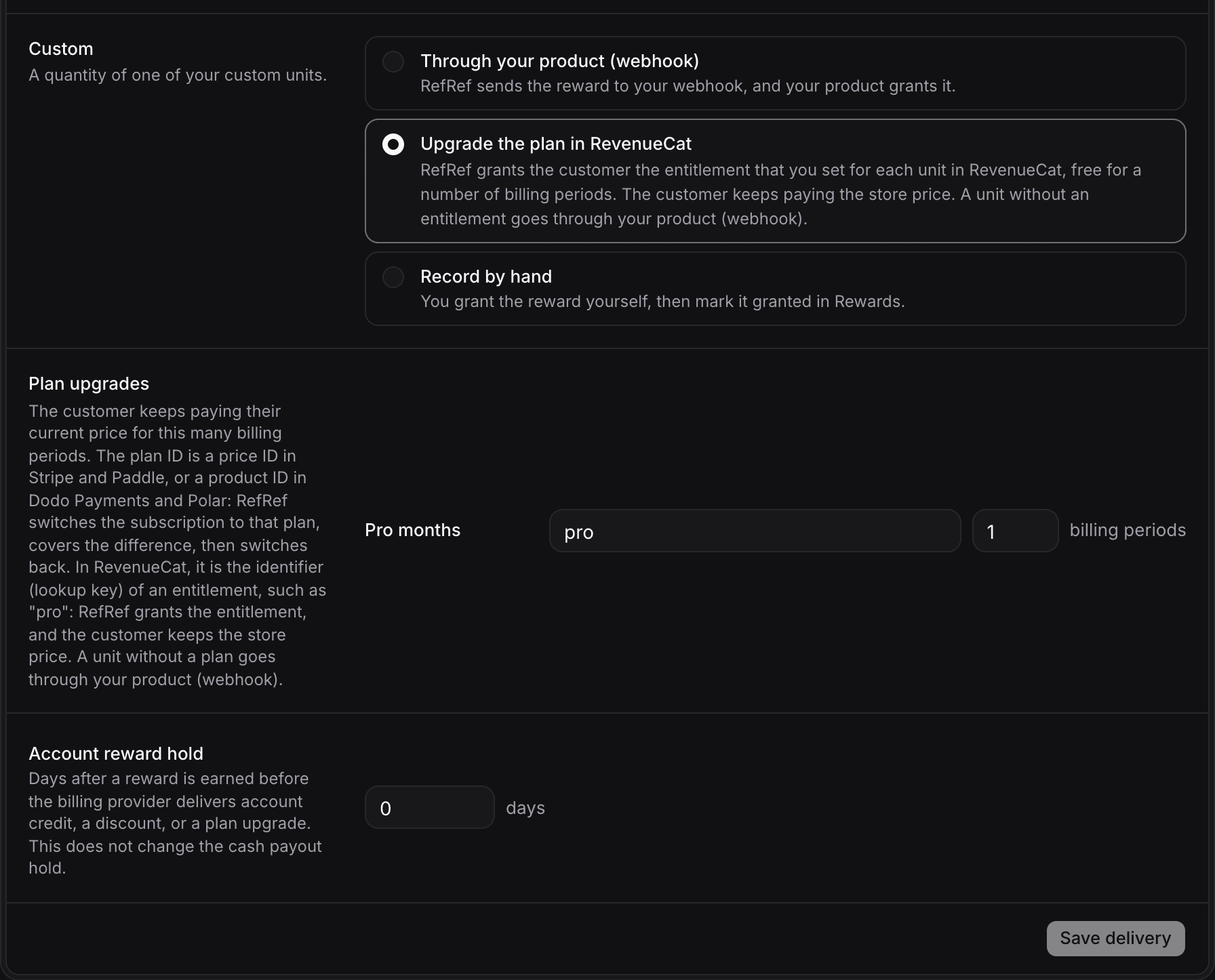
- In the Program's Delivery settings, choose Upgrade the plan in RevenueCat for custom Rewards. Under Plan upgrades, enter for the unit the identifier (lookup key) of the RevenueCat entitlement, for example
pro, in the plan field, and the number of billing periods, from 1 to 12. A unit without an entitlement goes through your product (webhook).
What the customer gets
- At once, RefRef grants the entitlement to the customer in RevenueCat. The grant lasts until the end of the Nth billing period after the current one. For a monthly subscription with 2 periods, it lasts to the end of the current month plus two months.
- The customer has the higher access for the rest of the current period and for the N periods after it, and pays the current store price for each renewal.
- The grant ends on its own at its expiry. RefRef does not need to switch anything back.
RefRef delivers to the RevenueCat customer whose App User ID is the beneficiary's externalId.
When RefRef does not grant
RefRef changes nothing, and the Reward waits for you with the reason, when:
- The customer has no active, renewing store subscription in the environment of the Project. A trial, a grace or billing retry period, a pause, or a subscription that is set to end does not count.
- The customer has more than one such subscription.
- The customer already has the entitlement: from a store subscription, or from any active grant, also one that you made by hand.
An unknown entitlement or customer fails the delivery with the message of RevenueCat.
Void the Reward
A void before the grant expires revokes the grant at once. RevenueCat then revokes every promotional grant of that entitlement for the customer, also a grant that you made by hand. A void after the expiry changes nothing.
Limits
- Paid history outside the App Store and Google Play. RevenueCat lists the transactions of App Store and Google Play subscriptions only. For a Test Store, web billing, Paddle, Amazon, or Roku subscription that was active between the referral and the purchase, RefRef cannot prove the referee's purchase history. RefRef also cannot prove it for a group participant. The purchase Reward then waits until your backend sends the proof with
POST /v1/evidence/paid-history. - Refunds of earlier periods. RevenueCat reports a refund only when the latest period of a subscription is refunded. A refund of an earlier renewal, for example last month's, sends no event, and RefRef keeps that purchase as paid.
- Missed refund events. RefRef does not find a refund whose webhook it missed.
- Other stores. RefRef finds missed purchases only for App Store and Google Play subscriptions. For other stores, facts come only from webhooks.
- Anonymous customers. A customer with only anonymous IDs never becomes a participant.
- Transfers. A one-time purchase that RevenueCat transferred is not recorded again for the new App User ID.
- One billing provider. A Project cannot connect RevenueCat and a web billing provider at the same time yet.
- Sandbox periods. A store sandbox renews a subscription every few minutes, but the grant lasts real billing periods. In a Sandbox Project, a 1-period grant of a monthly product lasts about one month.
Test the integration
- Connect a key of a RevenueCat test project to your Sandbox Project, and add the webhook with sandbox events only.
- Create a referral link for a participant. Sign a test user up on your website from the link, or send a signup Event for the test user with the participant's code in
refCode. - In your app, call
Purchases.logInwith the test user's ID and buy a subscription with the RevenueCat Test Store or a store sandbox account. - In the Sandbox Project, check Referrals for the referral of the test user.
- A Test Store purchase has no transaction list in RevenueCat, so its purchase Reward waits for the paid-history proof. Send the proof from your backend, then check Rewards. A premium access Reward shows its grant, and the customer in RevenueCat shows the entitlement with its expiry.
- Void the Reward in the Console, and check that RevenueCat no longer shows the entitlement.
A promotional grant gives access in production builds of your app too. Use a separate RevenueCat test project for the Sandbox Project, so that test grants never reach real customers.