An affiliate emails to ask when they'll get paid, and the answer lives somewhere between a spreadsheet, a PayPal tab and your memory of which customers refunded last week. That works until a refund lands after the money went out, or someone's bank details change the week of payday.
You can pay affiliates three ways: through PayPal, through Stripe Connect, or on your own rail (a bank transfer, ACH or Wise payment you send yourself). The cost has two parts: your platform's fee and the rail's fee for moving the money. And the safety steps matter more than the rail: hold for refunds, get tax forms first, pause when details change. This guide prices the platform fee on a hypothetical month, shows where each rail's fee comes from, then walks through each step.
Our pick for most programs is RefRef, and since RefRef publishes this blog, weigh that as you read. Its managed payouts cost 2% of the amount paid out, from the Starter plan, and paying on your own rail costs nothing extra. The math is all below, so you can check the pick instead of taking it on trust.
The three ways to pay affiliates
Every method ends the same way: money leaves your account and lands in the affiliate's. What changes is who holds it in between, who presses send, and what the affiliate has to set up first.
Pick the rail your affiliates already have, not the one with the nicest dashboard. A method that asks every partner to open a new account is one plenty of them will put off until your second reminder.
A managed payout provider (PayPal and similar)
Here the affiliate platform totals each affiliate's approved commissions and sends them as one batch through a payout provider, usually PayPal. The affiliate needs only a PayPal account and the email address on it. You fund the batch; the platform sends it and keeps the record.
RefRef's managed cash payouts go through PayPal to partners in 98 countries. Then there's the affiliate who doesn't have PayPal and isn't getting it. Every program has one, and it's never the affiliate you'd be happy to lose. That's what the other two routes are for.
Stripe Connect
With Stripe Connect, each affiliate onboards to Stripe as a connected account (a Stripe account a platform can send money to) and gets paid to their bank account or debit card. If you build payouts on Connect yourself and set your own pricing, Stripe bills you, not the affiliate. Stripe's published fees are $2 for each monthly active account, plus 0.25% and 25 cents per payout. If a tool sends the payouts for you, what you pay is whatever that tool's pricing says. Stripe counts an account as active only in a month it's paid, so the quiet affiliates are the cheap ones: no payout, no account fee.
Standard payouts typically arrive 1 to 2 business days after they're sent, and instant payouts usually land within 30 minutes for 1% of the volume. Paying across borders adds a fee starting at 0.25% of volume. RefRef sends Stripe Connect payouts as well as PayPal, so affiliates who'd rather skip PayPal still get a managed route.
Your own rail (bank transfer, ACH, Wise)
Your own rail means you send the money yourself, by bank transfer, ACH (the US bank-to-bank network) or a service like Wise, then mark the commission paid in your affiliate tool. It's the most hands-on route: you hold the bank details, run the transfers and reconcile them against what the tool says you owe.
The rail fee is whatever your bank or provider charges. Wise lists business sends from 0.23%, depending on the currency, and says its batch payments tool adds no cross-border fee on same-currency transfers. Wires sit at the other end: Matt McWilliams puts them at $15 to $50 each.
In RefRef, these payouts are "Paid by you, recorded by hand": you send the money, then click Mark paid. RefRef charges nothing extra for it, on any plan. That's as it should be: a platform has nothing to take a cut of when the money never passes through it.
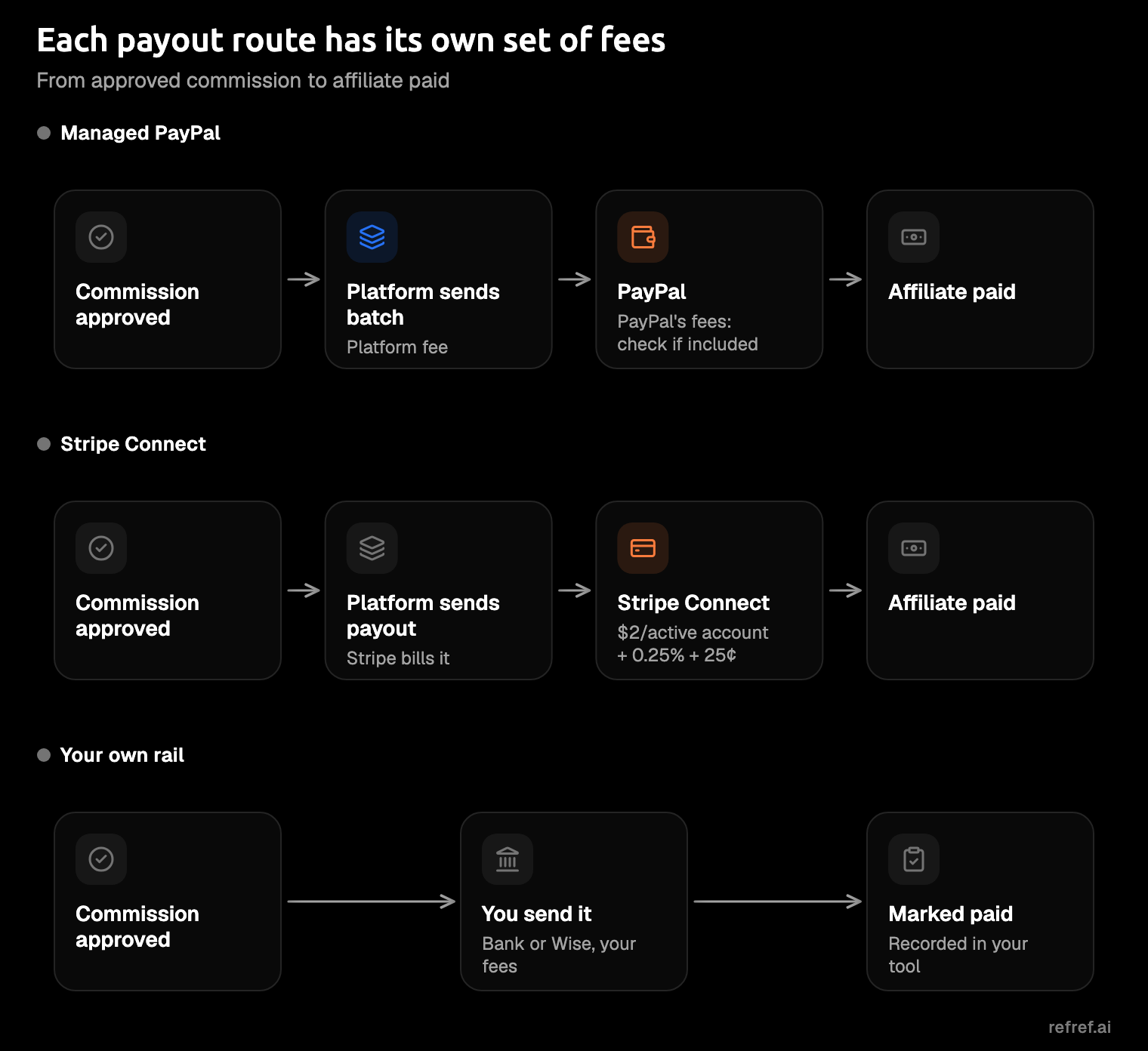
What each method costs: a worked month
A payout can cost you in two places: the platform's fee on the volume you pay out, and the rail's fee for moving the money. Start with the platform fee, since it's the one you can line up across vendors. Take a hypothetical month, with our numbers and our arithmetic: you owe $5,000 in commissions to 50 affiliates, $100 each. Each figure below is from the vendor's pricing or help page as it read on November 10, 2026.
| Platform and route | Fee on payout volume | On this month |
|---|---|---|
| RefRef, managed (PayPal) | 2% | $100 |
| Tolt | 2% | $100 |
| Rewardful Managed Payouts | 3% | $150 |
| Dub Partners, ACH-funded | 5% | $250 |
| Dub Partners, card-funded | 8% | $400 |
| RefRef, paid on your own rail | 0% | $0 |
The last row is RefRef's own-rail figure; for the other vendors, check how their pricing treats payouts you send yourself. Dub's Enterprise plan lowers its fees to 3% and 6%; Rewardful's managed payouts are optional, and its affiliates may pay their own withdrawal fees. For the rest of each comparison, see RefRef vs Tolt, Rewardful and Dub.
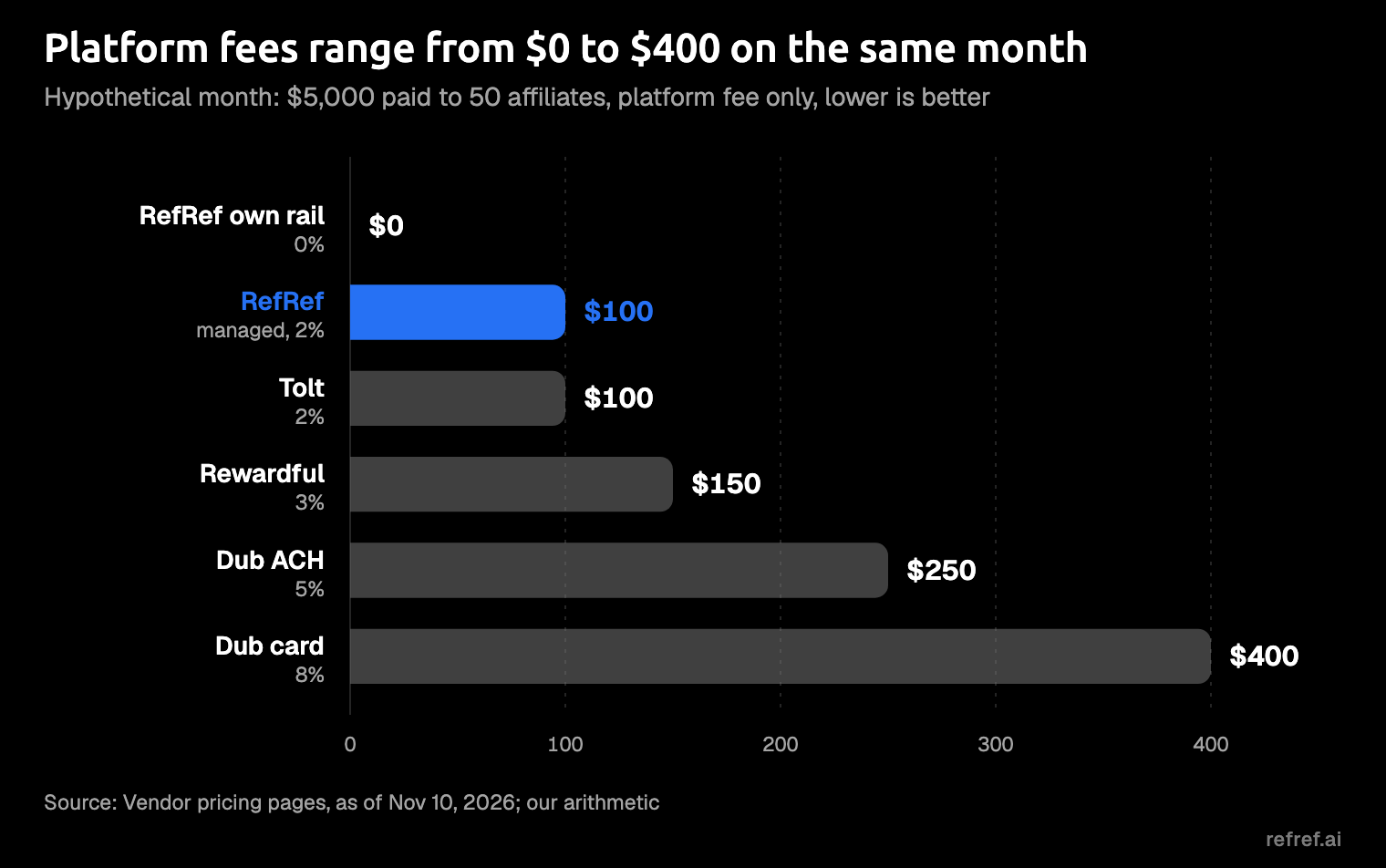
The fee on payout volume, not the plan price, decides your bill as the program grows. A percentage grows with every affiliate who has a good month, which is exactly the outcome you're hoping for. Add up a 5% fee over a year of payouts and it stops being a rounding error and becomes a line someone questions in the budget review.
Caps are the other number to check. RefRef caps managed payouts per plan: this month needs Pro S, whose cap is $5,000, while Starter's is $1,000, and anything over the cap waits for the next month. Dub caps payouts by plan too, at $30K a year on Business.
Then there's the rail fee, and it depends most on where your affiliates live. Before you add it to a platform fee, check whether your platform's fee already includes the provider's:
- Stripe Connect: if you built on Connect yourself, Stripe's published fees come to $125 before any cross-border charge. That's $100 in account fees (50 active accounts at $2), $12.50 in percentage fees and $12.50 in per-payout fees.
- Managed PayPal: PayPal's share depends on which countries your affiliates are in and which currency they're paid in, so price it from PayPal's fee page for your mix.
- Your own rail: your bank's or Wise's charge per transfer, which can be modest for a Wise batch and painful for a stack of wires.
Set a payout schedule and a refund hold
A payout schedule answers the question affiliates ask most: when do I get paid? The common answer is monthly, on a fixed date, with a delay long enough for refunds to show up first.
Pay after the refund window closes, never before.
Tolt's guide recommends net-30, meaning you pay commissions 30 days after the month they were earned. It says the waiting period is typically 30 to 60 days, to cover refunds and chargebacks, and suggests a minimum payout of $50 to $100. Matt McWilliams ties net-30 to the standard refund window and adds an extra 30-day hold on a new affiliate's first payment. Dub defaults to a 30-day hold, lets you pick anything from 0 to 90 days, and advises against 0.
A commission paid on a sale that's refunded the following week is money you now have to ask for back, from someone you'd like to keep promoting you. Three settings keep that conversation rare:
- Pick one payday and print it on your join page and in your payout emails. A fixed date ends most "when do I get paid?" emails before they're written.
- Set the hold longer than your refund window. If your customers can get their money back within a month, a month's hold is the floor, not the target.
- Set a minimum payout so you aren't sending someone the price of a coffee and paying a fee to do it. Dub's default minimum is $0, with options from $10 to $100.
In RefRef you set the payout hold and the minimum payout in the program (rewards docs), so the schedule partners see is the one you actually run. If a refund lands after a referrer's cash reward has gone out anyway, RefRef deducts the clawback from that referrer's next payouts.
Collect payout details and tax forms before the first payout
Collect payout details and tax forms before anyone has earned a payout. Once the first commission has gone out, you're chasing W-9s from people who've already been paid and have much less reason to reply. Tolt collects W-9 and W-8 forms before a partner's first payout and handles 1099s; Dub collects W-9s and W-8s and sends the 1099-NEC. This isn't tax advice: the forms and thresholds below are what the IRS and the tools publish, and what you file is your accountant's call.
- Ask for the payout destination and country at signup. The country decides which form you need and which rails can reach the affiliate.
- Collect a W-9 from US affiliates and a W-8BEN from non-US individuals. The W-8BEN is the IRS form a non-US individual uses to state they're not a US taxpayer.
- Hold the first payout until the form is on file. No exceptions for your favorite affiliate; they tend to be the ones with the biggest first payout.
- Know the 1099-NEC threshold. The 1099-NEC is the form a US business files to report what it paid a contractor. The IRS puts the threshold at $600 for payments made before 2026 and $2,000 for payments made in 2026, as its page read on November 10, 2026.
RefRef keeps W-9 and W-8BEN forms on record, and a partner's first Live cash payout waits until the form is in, so a managed payout can't go out ahead of the paperwork.
Handle failed payouts and changed details safely
Payouts fail for dull reasons: a typo in a PayPal email, a PayPal account that can't receive money, a bank account the affiliate closed and forgot to mention. The fix always has the same shape: catch it, tell the affiliate, update the details, retry. What differs between tools is how quickly you find out.
Stripe marks a payout failed, disables the affiliate's external account until the details are updated, and sends a payout.failed event. Dub marks a PayPal payout "Failed" when the partner's PayPal account can't receive it; the partner fixes the account and the payout is retried. RefRef sends payout.paid, payout.failed and payout.returned webhooks and alerts operators when a payout fails, so a returned payment doesn't sit unnoticed until the affiliate emails you.
Changed payout details are the riskier case. In an account takeover, someone gets into an affiliate's account, or impersonates them by email, and swaps the payout destination before payday. The money goes out on time, to the wrong person, and you hear about it when the real affiliate asks where it went.
Treat a changed payout destination like a changed password: confirm it, then wait before money moves.
- Require a fresh sign-in to change payout details.
- Hold payouts for a few days after a change, so the real owner has time to notice.
- Refuse changes by email. The friendly note the day before payday, new bank details attached, gets a polite reply pointing to the portal.
RefRef does the first two for you: changing payout details needs a recent sign-in and holds payouts for 72 hours.
Which method to pick
Match the method to where your affiliates already are:
- Most affiliates on PayPal, and a small program: managed PayPal payouts. The least setup on both sides.
- Affiliates already on Stripe, or who'd rather be paid without PayPal: Stripe Connect.
- A few large affiliates, or ones in countries where PayPal is thin: your own rail, by bank transfer or Wise. Our rule of thumb: a few hand-sent transfers cost you an afternoon, while talking your best partner into a PayPal account can take a quarter.
Most programs end up with a mix, which is an argument for a platform that sends two of them for you and records the third, instead of three browser tabs. For that platform, our pick is RefRef. Its managed fee ties Tolt's at 2%, the lowest managed fee in the table, so the tiebreakers decide it:
- A free plan to start on. RefRef's free plan covers up to 1,000 monthly active participants with no time limit, and managed payouts start on Starter at $49 a month, or $29 billed yearly (pricing). As of November 10, 2026, Tolt's plans start at $99 a month and Rewardful's at $49, and Dub's Business plan shows $81 a month on its pricing page.
- All three routes. Managed payouts go out through PayPal or Stripe Connect, and a transfer you send yourself gets recorded with
Mark paid. - Open source under AGPLv3. Read the code on GitHub, and use RefRef Cloud or self-host it on your own servers (docs). None of the other platforms compared here is open source.
It isn't ahead everywhere.
- RefRef's managed rails are PayPal and Stripe Connect; Tolt also sends through Wise, local bank transfer and wire, and Rewardful through Wise. If your affiliates need those, pay them yourself and record it in RefRef at no extra cost.
- On 1099s, Tolt and Dub list handling on their pages; what RefRef lists is the forms on record and the first payout held until they're in.
- A big month can outgrow your plan's managed payout cap; a larger Pro size raises it, and your own rail is there for the overflow.
FAQ
How often should you pay affiliates?
Monthly, on a fixed date, is the norm, usually net-30 with a hold that outlasts your refund window.
Can I pay affiliates with PayPal?
Yes. Your affiliates need only a PayPal account and the email address on it, which makes it the easiest route to start on. In RefRef, managed payouts run on PayPal, to partners in 98 countries, or on Stripe Connect.
Do affiliates need to fill out a W-9?
US affiliates fill out a W-9; non-US individuals fill out a W-8BEN instead. Collect it before the first payout, and ask your accountant what you need to file afterwards.
What does RefRef charge to pay affiliates?
Managed payouts cost 2% of the amount paid out, from the Starter plan up, and paying on your own rail costs nothing extra on any plan. There's no share of referred revenue on top.
Run a test payday first
The cheapest way to find out whether a payout setup works is to run one where mistakes cost nothing. Start free on RefRef Cloud, create an affiliate program in your Sandbox Project, send a test referral through it, and run a full payout cycle. Sandbox payouts are simulated and move no money, so a wrong setting costs you nothing but a second try. When the dry run looks right, you'll know which rail your real affiliates should get.