It's payout day, and one partner looks like a star. Their referred signups fill a screen of the report, the commission line matches, and almost none of those accounts has ever paid you. Or it goes the other way: a refund lands just after the reward went out, and now you're drafting an awkward email asking for it back.
Affiliate fraud prevention is mostly a design problem, not a detective one. The same six patterns turn up in referral and affiliate programs again and again, and each has a program rule that stops it getting paid. This guide takes them one at a time: what the pattern looks like, the tell in your data, and the rule that shuts it down.
Detection catches some fraud; rules stop it paying.
RefRef publishes this blog, and it's the worked example throughout: here's the rule, and here's the setting that runs it in RefRef. Where another tool does something RefRef doesn't, we say so in plain words.
The one rule under all the others: pay on money, after the refund window
Most fraud dies when a reward needs a paid event and then waits out your refund window. A fake account can sign up for free, but it can't easily pay. A buyer who plans to refund can't collect before the refund lands. Put the two together and farming your program stops being worth anyone's time.
So never pay cash on a signup. A program that does has written the fraudster's job description for them.
You'll hear the objection from your own team: "but signups are what we want." Fine. Count them, chart them, show them to partners in their dashboard. Just don't attach money to them. A signup costs a fraudster an email address; a purchase costs them a card and the price of your product.
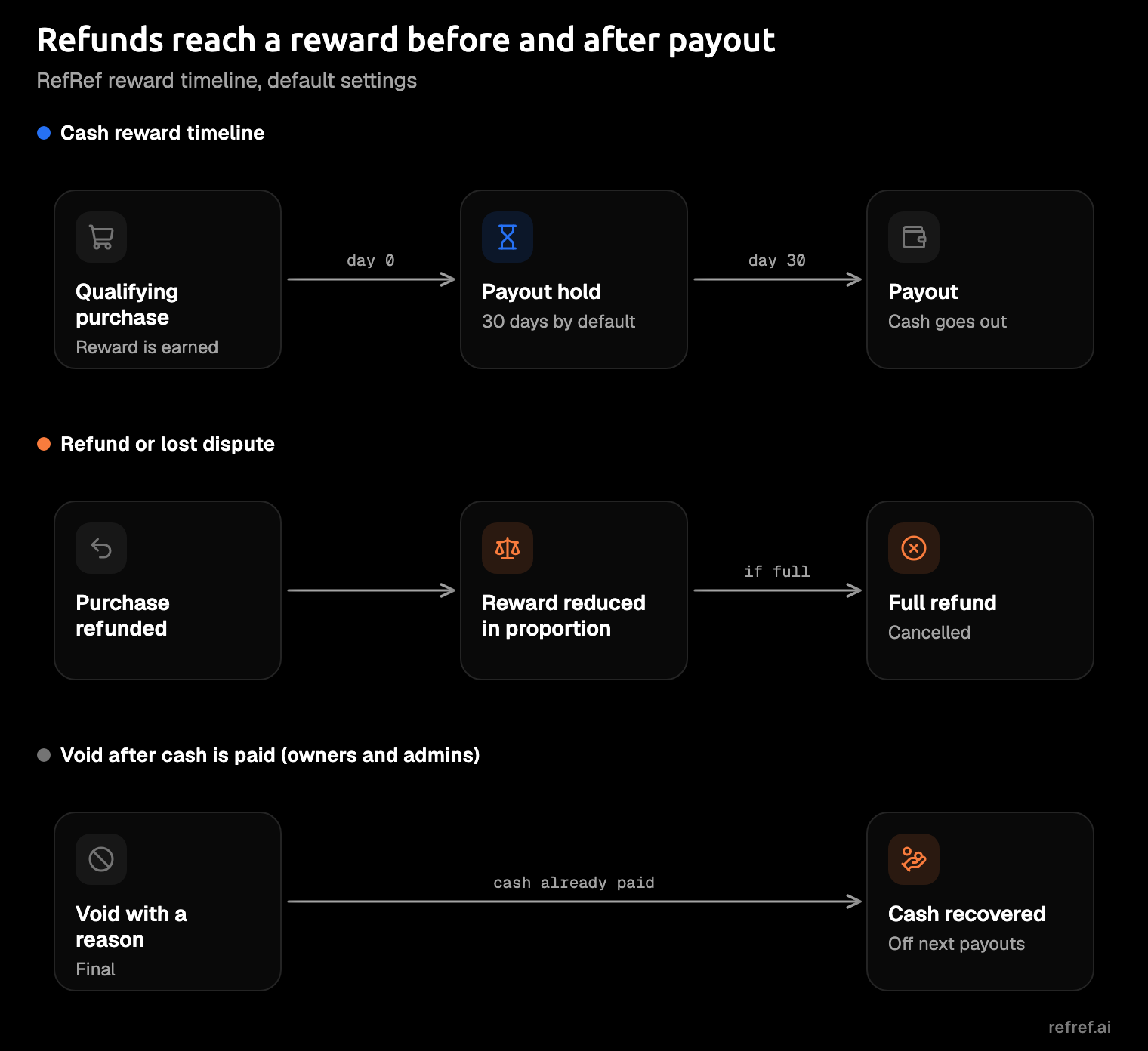
Then match the hold to your refund policy. Here's a hypothetical: your refund policy is 30 days, so you set the payout hold to 30 days as well. A reward earned on a customer's first day sits pending until the refund window has closed, and only then pays out. If the customer refunds inside the window, the money never leaves your account.
In RefRef, three settings do this, each with its own job:
- Reward rules decide what pays. Each program's rules turn events into rewards, and each rule belongs to one event type. For a cash program, put the reward on
purchaseand givesignupno reward at all. - Qualifying events decide when a referral binds. They're set per Project, and the default list is
signupandpurchase. Once a referral exists, an event of any type can earn a reward, so this list doesn't keep signups unpaid on its own; the reward rule does. - The payout hold decides when cash leaves. Each program has one for cash RefRef pays, anywhere from 0 to 365 days with a default of 30.
Two smaller settings sit beside the hold: an account reward hold for rewards delivered through your billing provider, which defaults to 0, and a minimum payout. A change to any of them applies to later rewards, not ones already earned.
If your rewards are account credit a customer can spend right away, give the account reward hold the same length as your refund window. The qualifying events docs and program settings show where the list and the holds live.
1. Self-referrals
A self-referral is a referrer who is also the customer. It might be someone using their own link for the discount, a second account opened to refer the first, or a partner buying through their own link to earn commission on their own purchase.
The tells are in your signup and billing data: the partner and the customer share an email domain, a card, or an IP address. A brand-new partner's first conversion minutes after approval is worth a look too, though it's usually the partner testing their own link.
The rule is the one above plus a cleanup step: reward only paid events, hold the reward, and void what you find. Not every self-referral is a loss. One that pays full price is still a paying customer.
One that collects a referee discount and a referrer reward on the same purchase is a sale you've paid for twice.
In RefRef, the obvious version is blocked outright. A referrer's own link or code never credits them, and a referral whose referrer is its referee is refused. An already-referred customer can't be credited to a second partner either, so nobody can claim a buyer someone else brought in.
The second-account version is what the purchase reward and the hold are for: before anything pays, the fake referee has to make a real purchase and keep it past your refund window. That second step needs a hold set to the window, and the account reward hold starts at 0. Whatever slips through, an owner or admin can void the reward with a reason, and a void is final. You can void the referral itself, too.
One weak spot, plainly: RefRef doesn't match referrers to customers by email, IP or card. Other tools do. Competitor details in this guide come from their own help pages, checked November 10, 2026. Tolt blocks a referral when the customer's email or company domain matches the partner's, on Pro or higher. FirstPromoter detects the same email or the same IP. Dub flags a matching customer email or a shared payment card (Stripe only), on Advanced and above. Matching helps you spot the pattern sooner. In RefRef, the purchase reward and a hold set to your refund window are what keep it from paying.
2. Fake and throwaway signups
Fake signups are bots or disposable email addresses farming a per-signup reward or a referee discount. They're cheap to make in bulk, which is the whole appeal.
The tell is a burst: a pile of new referrals from one source in a short window, disposable email domains, and accounts that never activate or buy anything.
A flood of new referrals overnight isn't good news; it's a bill with your name on it.
The rule: no reward on signup, ever. A signup bounty is the one reward you shouldn't offer. If your program is double-sided (both the referrer and the new customer get something), give the new customer's discount at checkout, so it only exists alongside a purchase. Stripe's guide to promo abuse makes a similar call for high-risk accounts: hold promo credit until a genuine purchase, and limit redemptions per verified identity.
In RefRef, that's a reward rule on purchase and none on signup. A fake account can still sign up through a partner's link, and with the default list its referral binds right there. It just never earns: rewards come from the program's reward rules, and a referral that never buys never sets off the purchase rule. On the new customer's side, the Referral Widget shows the referee's discount code and applies it on Stripe, and a discount code only costs you anything when someone checks out with it.
The gap: RefRef doesn't flag disposable email domains, and Dub does, on Advanced and above. For rewards, it matters less than it sounds: a throwaway address can sign up all day, but with the reward on purchase, it earns nothing until it buys. If you're still sizing the rewards themselves, how to choose referral rewards works through the margin math.
3. Refund and chargeback abuse
Refund abuse is buy, collect, refund. Someone makes a qualifying purchase, the reward goes out, and then the money comes back through a refund or a chargeback (a dispute the cardholder files with their bank).
The tell is timing: a reward paid, then a refund or dispute soon after. Watch, too, for one payer behind several referrals, the same card turning up under different names.
The rule has three parts:
- Hold rewards past the refund window.
- Reduce or take back the reward when a refund lands.
- Recover cash that has already gone out from the partner's future payouts, instead of sending them an invoice.
Match the hold to your refund policy, not to what partners would like. Partners will always ask for faster payouts, and a shorter hold just moves the refund risk back onto you. You don't want to be chasing a partner to return a commission they've already spent.
In RefRef, the payout hold keeps cash pending, 30 days by default. A refund or lost dispute reduces that purchase's rewards in proportion, and a full one cancels a reward that hasn't been delivered yet. A full refund also takes back a delivered non-cash reward, such as account credit. For cash that's already been paid, voiding is the documented route: you void the reward, the void is final, and the paid cash comes off the referrer's next payouts. The rewards docs walk through each case.
Other platforms handle the same moment in their own ways:
- Rewardful holds commissions as pending for 30 days by default and suggests matching that to your refund policy. After payout, its refund page leaves the overpayment for you to handle manually.
- FirstPromoter turns refunds and chargebacks into negative commissions.
- Tolt can auto-approve commissions after a set number of days, and tells you to match that to your refund window.
- Cello cancels pending rewards automatically when a refund comes in.
4. Coupon and code leaking
Code leaking is a partner's code escaping to coupon sites or browser extensions, so the partner earns on customers they never sent. LoudCrowd, a vendor in this space, describes both routes: the partner posts the code there, or the sites scrape it.
The tell is redemptions without clicks. If a partner's code keeps getting used by customers who never touched the partner's link, someone else is handing it out.
The rule: attribute by link where you can, keep codes for the audience the partner actually talks to, cap rewards, and replace a code once it's leaked. A code that works for anyone is a public discount with a commission attached.
In RefRef, attribution can come from either route. A landing script swaps the click for a first-party cookie that lasts 90 days, and your backend identifies it at signup. Any event can also carry a code the new customer typed (refCode), so link attribution doesn't switch codes off: a leaked code keeps crediting its partner for whoever types it. Rewards support caps and allowances, which limit what those rewards can add up to.
The gap: RefRef doesn't watch coupon sites or rotate codes for you. LoudCrowd's countermeasures are to reissue leaked codes and to use codeless discounts tied to the link. Search the big coupon sites for your partners' codes now and then; it's dull, and it's quicker than explaining a commission line to your finance lead.
5. Cookie stuffing and brand-bidding
Both are partners taking credit for customers who were coming anyway. Cookie stuffing drops a referral cookie without a real click, through hidden frames, invisible images or redirects. Brand-bidding is a partner buying search ads on your brand name, so someone who typed your product's name clicks the partner's ad instead of your own listing.
That partner is paying Google to introduce you to people who were already looking for you.
The tells differ. For stuffing, look for conversions with no click path, or almost no time between the "click" and the sale. For brand-bidding, look for partner links carrying gclid or msclkid, the click IDs that Google and Microsoft ads add to a URL.
The rule for brand-bidding is a contract term, not a software setting. Track360, a vendor, lists the usual policies: a full ban, a ban on your exact trademark that still allows modifiers (common in SaaS), or a whitelist of allowed keywords. Audit paid search every month, and enforce in steps: written notice, paused commissions, a clawback, then termination and revoked links.
Put brand-bidding in the application terms, not in a warning email later. A partner who agreed to the rule before their first click is much easier to remove.
In RefRef, the defense starts at the door. Partners apply on a public join page with up to 10 questions, auto-approve and auto-decline rules, a Turnstile bot check, and bans. Ask how they plan to promote you, and set auto-decline rules for the applications you'd always turn down. Partner tiers give each level its own commission, and you can pin a partner to a tier, so one you're unsure of stays on a lower rate while you watch. When a partner breaks the terms, remove them: a removed partner earns nothing after removal, and you can void rewards they've already earned. The partner docs cover applications, tiers and bans.
The gap: RefRef has no paid-traffic or cookie-stuffing detection. FirstPromoter detects referrals from paid ads on Google, Meta, TikTok, Microsoft and others, with a per-partner rule to allow them, hold them as pending, or block them. Dub flags paid traffic too, on Advanced and above. In RefRef, your terms and a monthly search audit are the control; between audits, a bid on your brand can run unnoticed.
6. Partner account takeover
Account takeover is someone getting into a partner's account and pointing the payout somewhere else just before a run. The partner finds out when the money doesn't arrive. You find out from the support ticket: "I never changed my PayPal."
The tells are payout details that change shortly before a run, and one payout account behind several partners.
The rule: ask for a fresh sign-in before anyone changes payout details, hold payouts for a while after a change, and make sure the partner hears about it.
A delay costs an honest partner nothing and costs a thief the whole point.
In RefRef, changing payout details needs a recent sign-in, and payouts hold for 72 hours after the change. Tax forms help as a side effect: a partner's first Live cash payout waits for their W-9 or W-8BEN, so a brand-new account can't cash out before there's a form on record. FirstPromoter takes a similar line, requiring email verification before a payout-method change.
What your platform should do for you
Whatever tool you run, each rule should be a setting you switch on, not a habit you have to remember on payout day.
| Fraud pattern | The rule that stops it paying | Where it lives in RefRef |
|---|---|---|
| Self-referrals | Reward paid events only, hold, void | Own link or code never credits the referrer; reward rule on purchase; payout hold; void with a reason |
| Fake and throwaway signups | No reward on signup | Reward rule on purchase, none on signup (qualifying events only decide when a referral binds) |
| Refund and chargeback abuse | Hold past the refund window; take back on refund | Payout hold (default 30 days); reduction in proportion; voided cash off the next payouts |
| Coupon and code leaking | Attribute by link; cap rewards | First-party cookie attribution (typed codes still count); caps and allowances |
| Cookie stuffing and brand-bidding | Written terms; vet at application; remove | Join page questions, auto-decline rules, Turnstile, bans, tiers; remove and void |
| Partner account takeover | Re-authenticate and hold after a payout-detail change | Recent sign-in; payouts hold 72 hours |
Some platforms add automated detection on top of rules:
- Dub: risk monitoring flags duplicate accounts, matching emails, disposable domains, shared cards and paid traffic, on Advanced and above. A shared-card flag holds unpaid commissions for every customer sharing that card.
- FirstPromoter: detects self-referrals and paid-ad referrals.
- PartnerStack: runs fraud monitoring through Sift, and by default a flagged partner can't cash out.
- Cello: scores referrals by risk factors and flags likely self-referrals for review.
- Rewardful: flags possible self-referrals and emails you to review them.
RefRef doesn't have a scoring engine. It stops fraud with program rules.
The upside: what gets paid in RefRef is decided by the rules you set, while some platforms also hold or block payment when a risk flag fires. When a partner asks why a reward didn't pay, the answer is a rule you can point to. RefRef is also open source under AGPLv3, so you can read the code behind how a referral is decided, and use RefRef Cloud or self-host it on your own servers (docs).
So RefRef is our pick. It puts the rules above on one platform: purchase-based reward rules, payout holds, proportional take-back on refunds, caps, voids, the own-link block, bans, application rules, and the 72-hour hold on payout-detail changes. The same integration runs your referral, affiliate and loyalty programs on one customer record. Plans are on the pricing page, and the Dub and FirstPromoter comparisons go feature by feature.
Test it before a fraudster does
This test takes one sitting. Start free on RefRef Cloud: the free plan covers up to 1,000 monthly active participants, with no time limit. Account credit goes out through your billing provider, so connect one to the Sandbox Project first. Then give a program an account-credit reward on purchase and nothing on signup. Send a test referral through: sign up and see that nothing is earned, make the purchase and see the reward appear, and refund it in full to watch the reward go away.
That's the whole guide in one refund.